
Merge Hole Output Modes
When Merge Overlapping Polygons creates shapes that contain holes, LinkCAD can emit the result in three different representations.
Use this page as the reference for the Draw generated holes using… option in the Merge dialog.
Modes
| Mode | What geometry is emitted | Best for |
|---|---|---|
| Cut-lines in re-entrant polygons | One polygon per merged island, with bridge/cut-lines connecting each hole to the outer boundary | Workflows that require a single contour object and can accept bridge segments |
| Sliced simple polygons | Multiple simple polygons with no holes and no internal cut-lines | Downstream tools that reject re-entrant boundaries but can consume multiple polygons |
| Extract holes as polygons | Hole regions emitted as standalone polygons, separate from the outer shape | Pipelines that represent holes as explicit independent polygons |
Visual Comparison
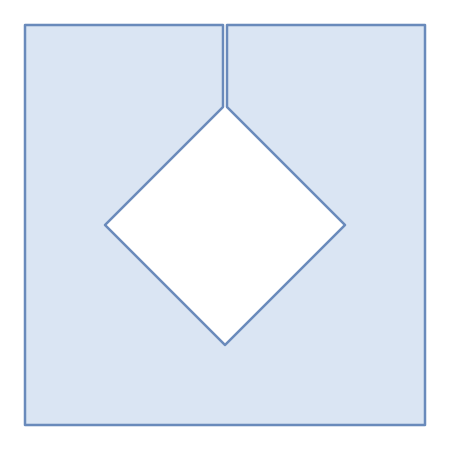
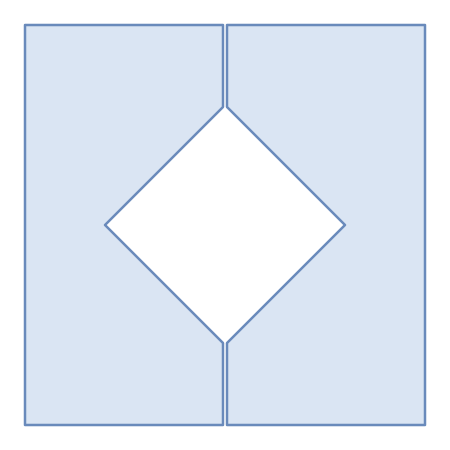
Important: In these illustrations, visible gaps and separation are intentionally exaggerated for clarity. In real outputs (for example, photomask data), cut-lines and sliced boundaries are superimposed and typically not visible as open gaps.
Cut-lines in re-entrant polygons
The hole is linked to the outer contour by a cut-line, producing a single re-entrant polygon boundary.
Sliced simple polygons
The shape is split into multiple simple polygons so no cut-line is needed.
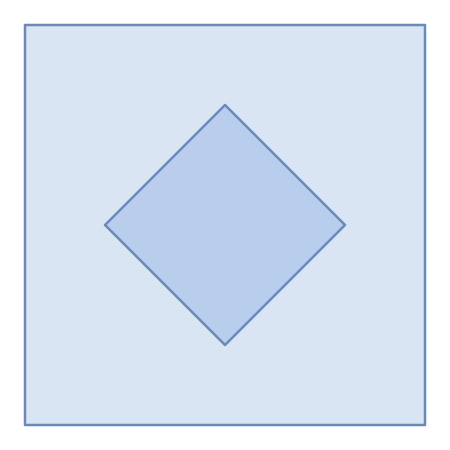
Extract holes as polygons
The outer region and the hole are emitted as separate polygons. Depending on the target format and renderer, these independent polygons may overlap in display or require additional post-processing to reconstruct hole semantics.
Choosing a Mode
- Use Cut-lines in re-entrant polygons when you want a single merged shape per island.
- Use Sliced simple polygons when your target toolchain requires simple (non-re-entrant) polygons.
- Use Extract holes as polygons when your pipeline explicitly manages hole regions as separate objects.
See also: Merge Overlapping Polygons, Extract Holes, and De-embed Polygons.